.png)
Completing a gateway integration checklist means working through five phases in order: business prerequisites, technical build, security and compliance, sandbox testing, and go-live. Before writing a single line of production code, run one end-to-end sandbox transaction and record the transaction ID and debug ID. That single test surfaces most of the gaps a rushed integration would otherwise ship with.
TL;DR:
- Ensuring all business documentation, website policies, and environment readiness are complete and verified before starting technical integration avoids unnecessary delays.
- Conducting a full end-to-end sandbox test, including failure scenarios and webhook load testing, is essential to catch issues before going live.
- Choosing a hosted checkout or iframe-based integration minimizes PCI DSS scope, reducing security complexity and audit burdens.
- Replacing sandbox keys with live credentials, testing a real transaction, and monitoring key metrics immediately after going live ensures a smooth transition and ongoing stability.
- High-risk merchants should prepare detailed underwriting documents and consider integrated services to streamline approval and avoid common pitfalls.
Table of Contents
- Pre-Integration Checklist: What to Prepare Before You Write Code
- How Do You Technically Integrate a Payment Gateway?
- What Does PCI DSS Mean for Your Integration?
- What Should You Test Before Going Live?
- Go-Live and Post-Launch Monitoring Checklist
- What Should High-Risk Merchants Prepare for Underwriting?
- Where Integrations Actually Go Wrong
- Let Davincipay Handle the Integration and the Underwriting
- Sources
- FAQ
Pre-Integration Checklist: What to Prepare Before You Write Code
Most gateway integration delays trace back to paperwork, not code. Acquirers and gateway providers both want a documented business before they hand you production credentials, and if you build first and gather documents later, you’ll stall at the exact moment you’re ready to launch.
Start with your KYC/KYB pack. Underwriters expect incorporation documents, beneficial ownership records, bank statements, and a description of your processing history. High-risk categories such as nutraceuticals, telehealth, and subscription billing get extra scrutiny here, so incomplete documentation is the single most common reason approval stalls.
Your website also needs specific public-facing pages before any acquirer will approve you. Gateway underwriters and card networks routinely check for:
- A privacy policy and terms of service that match your actual business model
- A visible refund or cancellation policy, especially for subscription or trial offers
- A working contact page with a real phone number or support email
- Accurate product descriptions and pricing that match what customers see at checkout
Environment readiness matters just as much. You’ll need a staging domain with valid SSL/TLS, correctly configured DNS, and a publicly reachable host for webhook callbacks. Most gateways can’t deliver webhook events to a local machine or an environment sitting behind a firewall, so plan your staging infrastructure to mirror production as closely as possible.
Lock down who talks to the gateway vendor before the project starts. Assign one technical contact and one business contact, and get both added to the gateway’s admin console with clear roles. Ambiguity here creates delays when the vendor needs a fast answer during onboarding review.
Finally, decide how you’ll manage secrets before you generate your first API key. Environment variables work for small teams; a dedicated secrets vault with rotation policies works better for anything handling live card data. Whichever path you choose, document it now, because retrofitting secrets management after go-live is far riskier than building it in from the start. A general website QA checklist is worth running against your staging site at this stage too, since broken links or missing policy pages will resurface during underwriting review anyway.
How Do You Technically Integrate a Payment Gateway?
Once the business groundwork is done, the technical build breaks into five distinct workstreams. Skipping the order below is how teams end up refactoring authentication logic after the front end is already built.
- Audit the API documentation first. Identify every required endpoint, the authentication model (API keys versus OAuth versus signed tokens), idempotency key requirements, rate limits, and the full error code catalog. Gateways vary widely here, and assuming one vendor’s auth pattern matches another’s is a fast way to burn a sprint.
- Choose your integration model deliberately. A hosted checkout page, hosted fields with tokenization, or direct API card capture each carry different engineering effort and very different PCI DSS obligations, covered in more detail below.
- Build the front end around tokenization. Implement hosted fields or a tokenization library so raw card numbers never touch your servers. Test the checkout flow on mobile browsers specifically, since viewport issues and autofill behavior break more mobile checkouts than any other single factor. Design clear UX for declined transactions, including a retry path that doesn’t force the buyer to reenter every field.
- Build the back end around order state, not payment state. Create the order record before the customer reaches checkout, then update it based on the payment result. Decide upfront whether you’re authorizing and capturing in one step or splitting authorization from capture, since split flows are common for merchants with fulfillment delays. Use idempotency keys on every payment request so a network retry can’t create a duplicate charge, and standardize how you handle currency and amount formatting across every code path.
- Configure webhooks deliberately, not as an afterthought. Subscribe only to the events you actually need. Verify every incoming webhook signature using a timing-safe comparison, and return an HTTP 200 immediately before processing the payload asynchronously in a queue. This single pattern prevents both timeout failures and duplicate event processing, since most gateways will retry a webhook that doesn’t get a fast acknowledgment.
Pro Tip: Store every processed webhook event ID in a database table before you act on it. If the same event ID arrives twice, which it will, checking that table first is the cheapest idempotency safeguard you can build.
What Does PCI DSS Mean for Your Integration?
Your integration model decides your PCI DSS obligations, and that decision should happen before you write any front-end code, not after. The PCI SSC quick guide maps different integration approaches to different Self-Assessment Questionnaire (SAQ) types, and the gap between them is significant.
A fully hosted checkout page, where the customer leaves your site to pay, typically qualifies for the simplest SAQ category because your servers never touch card data. Hosted fields, where the payment form is embedded via an iframe but the card data still flows directly to the gateway, sit in a lighter-scope category too. Direct API integration, where your server handles raw card numbers before forwarding them, pushes you into the most demanding SAQ tier with far more required controls.
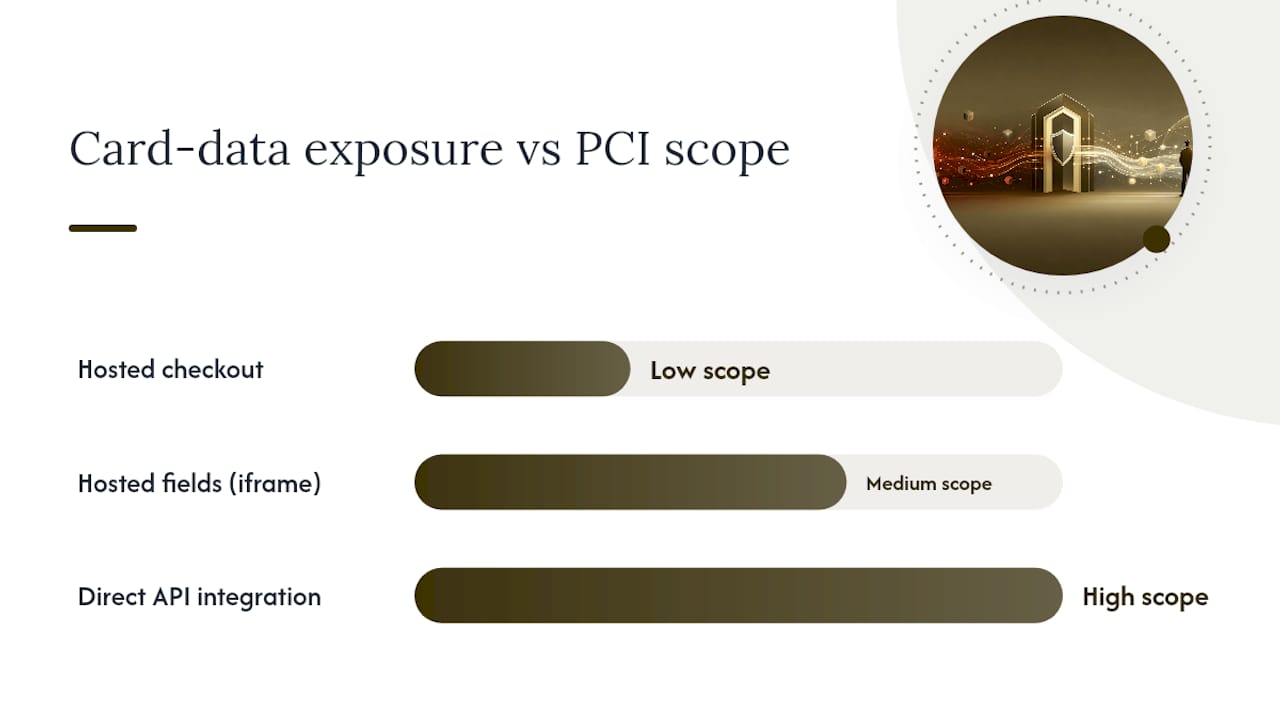
For most merchants, the practical move is clear: choose hosted fields or a redirect model unless you have a specific business reason to touch card data directly. The reduced PCI scope saves engineering time now and audit friction every year afterward.
Beyond PCI scope reduction, build in these security and fraud layers:
- Store only tokens, never raw card numbers, in your own database
- Forward the data required for 3-D Secure 2.2 (3DS2) so low-risk transactions can qualify for frictionless exemptions instead of triggering a challenge screen
- Integrate a pre-dispute alert service so you can act before a chargeback formally posts
- Enforce TLS on every endpoint and monitor certificate expiration proactively, not reactively
On that last point: chargeback alert services like Ethoca and Verifi typically give merchants a window of 24 to 72 hours to issue a refund before a dispute becomes a formal chargeback. Routing those alerts through your existing webhook infrastructure means your team can act inside that window instead of finding out about a dispute weeks later.
What Should You Test Before Going Live?
Sandbox testing is where an integration checklist earns its name. Skipping negative testing is the single most common reason merchants discover payment bugs from angry customers instead of from their own QA process.
- Run the full success path. A standard payment, confirmed webhook, and order status update, end to end.
- Run the failure paths deliberately. Simulate a declined card, insufficient funds, an expired card, and a duplicate invoice submission. Most gateways expose specific test card numbers or error codes designed to trigger these exact scenarios.
- Test partial refunds and simulated chargebacks. Confirm your back end updates order state correctly when a refund is partial rather than full.
- Collect the evidence gateways actually ask for. PayPal’s own go-live process requires specific sandbox artifacts: API request and response logs, transaction and debug IDs, and in some cases video walkthroughs of the buyer and seller flow. Other gateways ask for similar proof before flipping the switch to production.
- Load-test webhook delivery. Confirm your endpoint handles delayed or duplicate webhook deliveries gracefully, since most gateways retry undelivered webhooks on a fixed schedule and your system needs to tolerate that.
- Run formal UAT with clear gating criteria. Define what “ready for production” means in writing before your team starts testing, not after someone asks if you’re done.
Two completed, documented sandbox sales are the minimum most vendors expect before they’ll sign off on production access.
Go-Live and Post-Launch Monitoring Checklist
The switch to live traffic is a short list of steps, but each one has caused a real outage when skipped.
- Replace every sandbox key with its live equivalent, rotate any secrets that were shared during development, and confirm HTTPS and SSL certificate validity on every domain in the payment flow
- Strip test credentials and sandbox URLs out of your codebase and configuration entirely, not just out of the environment you’re deploying from
- Run a real $1 authorization and capture as your first live transaction, then confirm the funds actually settle and appear in your payout schedule
- Monitor transaction success rate, decline reason codes, 3DS challenge rates, webhook delivery failures, and your chargeback ratio from day one, not after the first incident
- Write incident playbooks in advance for webhook outages, delayed authorizations, and refund or chargeback processing failures
- Reconcile transactions daily against your gateway’s settlement reports, and review the full KPI set weekly with whoever owns the merchant relationship
What Should High-Risk Merchants Prepare for Underwriting?
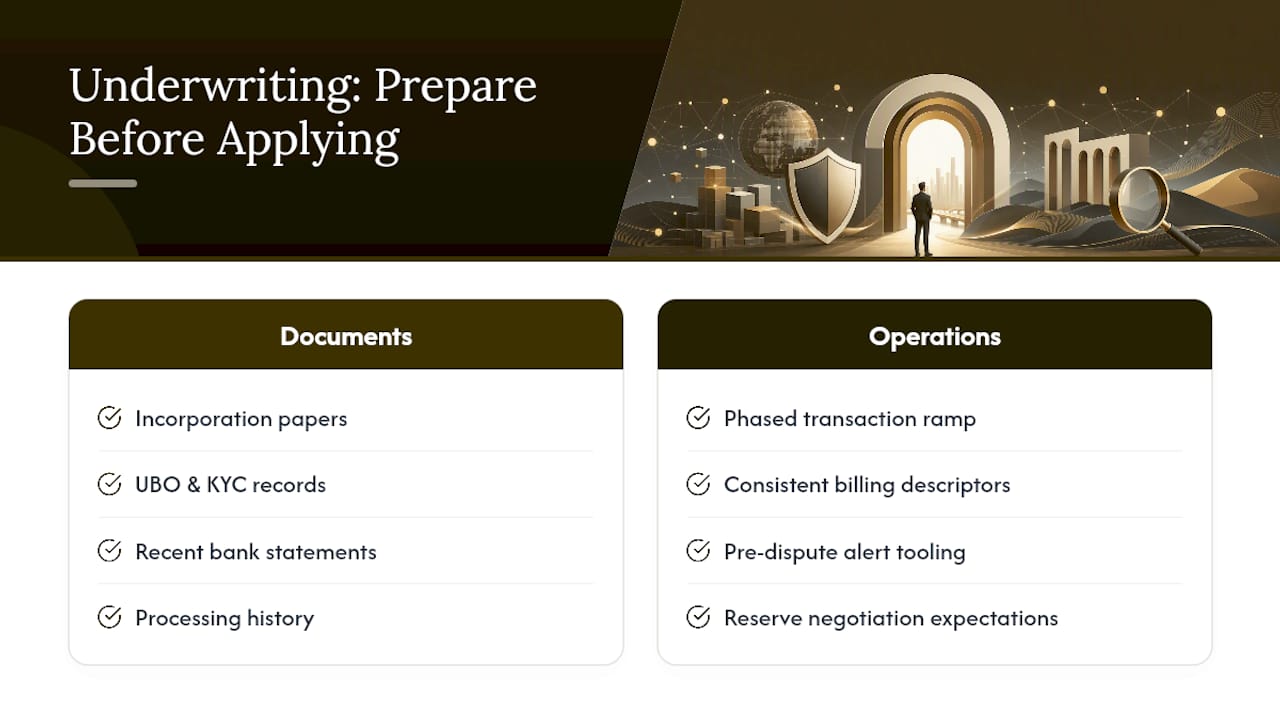
Davincipay specializes in payment solutions for high-risk and complex ecommerce businesses, helping merchants secure reliable processing through acquiring relationships, gateway integration, fraud prevention, and underwriting support. High-risk applicants should assemble incorporation documents, UBO and KYC records, recent bank statements, processing history, supplier contracts, shipping SLAs, and sample customer communications before applying. Beyond documentation, build in a phased transaction ramp, a consistent billing descriptor strategy, pre-dispute alert tooling, and realistic expectations around reserve negotiation as your processing history matures.
Where Integrations Actually Go Wrong
The mistakes that sink gateway integrations are rarely exotic. Test keys left in production configuration. Webhook signatures that go unverified because someone assumed the payload could be trusted. KYC packs submitted half finished because “we’ll send the rest later.” Every one of these is preventable with a checklist, not a smarter engineer.
If you have one week, spend it on the sandbox test matrix and webhook verification. Those two items catch the failures that actually reach customers. If you have six weeks, add the full underwriting pack, 3DS exemption logic, and a real load test on webhook delivery. Sequencing matters more than raw effort here.
— Peter
Let Davincipay Handle the Integration and the Underwriting
Building this checklist is one project. Getting approved as a high-risk merchant while you build it is another, and most teams underestimate how much time the underwriting side eats up. Some providers reduce that timeline by combining gateway integration with acquiring relationships and underwriting support high-risk merchants actually need to get approved the first time, not the third.
That means one point of contact instead of juggling a gateway vendor, an acquiring bank, and a chargeback mitigation tool separately. Some firms work with nutraceutical, telehealth, subscription, and other regulated merchants where standard processors routinely decline or delay approval, handling the acquiring relationships, fraud prevention tools, and chargeback mitigation that your integration checklist depends on. If you’re a supplement brand or a nutraceutical merchant preparing for this process, have your incorporation documents, recent bank statements, and processing history ready. Start by submitting your application and the team will walk you through what your specific business needs before you touch a single line of integration code.
This article is general information, not a substitute for advice from a qualified financial advisor. Consult a qualified financial professional about your own circumstances before acting on anything here.
Sources
- PCI SSC quick guide
- Developer
- Developer
- Razorpay standard checkout integration docs
- Fraud alert services integration guidance (Bluesnap support)
FAQ
What Is a Gateway Integration Checklist?
It’s the ordered set of business, technical, security, and testing tasks a merchant completes to move a payment gateway from sandbox to a live, compliant production environment.
How Long Does a Payment Gateway Integration Take?
A straightforward integration with a standard-risk merchant can take one to two weeks; high-risk or regulated merchants often need four to six weeks to complete underwriting alongside the technical build.
Do I Need to Be PCI DSS Compliant to Integrate a Gateway?
Yes, but your obligations scale with your integration model. Choosing hosted fields or a redirect checkout, as outlined in the PCI SSC quick guide, significantly reduces your compliance scope compared to handling raw card data directly.
What’s the Biggest Mistake in Gateway Integration Testing?
Skipping negative testing. Teams that only test successful payments in sandbox routinely discover decline handling, webhook failures, and duplicate charge bugs only after real customers hit them.
Can Davincipay Help With High-Risk Gateway Integration?
Yes. Davincipay combines gateway integration with underwriting support, acquiring relationships, and chargeback mitigation specifically for high-risk and regulated merchants preparing to go live.


.webp)