.png)
An ecommerce plugin payment gateway connection is the process of linking your online store’s payment plugin to a gateway that securely authorizes and processes customer transactions. Getting this right determines whether customers complete their purchase or abandon the checkout page. The integration method you choose, whether hosted redirect, native API, or platform-native, directly affects your PCI compliance burden, your checkout experience, and your operating costs. OAuth authorization, PCI DSS compliance, and webhook handling are the three technical pillars every merchant must understand before going live.
What are the prerequisites for ecommerce plugin payment gateway connection?
The foundation of any payment gateway integration is a verified merchant account paired with an active payment gateway account. Without both, no plugin can process live transactions. Your ecommerce platform must also support the gateway you choose. Most major ecommerce platforms support over 65 pre-integrated payment gateways, with official plugins that reduce connection time from days of manual coding to under 10 minutes.
Before you touch a single setting, gather these items:
- Admin dashboard access to your ecommerce platform
- An installed and activated payment gateway plugin (use the official plugin from the gateway provider)
- API keys or OAuth credentials from your gateway account
- A sandbox or test account to verify the connection before going live
Understanding integration types
The choice between hosted and native API integrations is a trade-off between checkout control and PCI compliance burden. Hosted integrations redirect customers to the gateway’s payment page. That offloads payment data handling and reduces your PCI DSS SAQ scope significantly. Native API integrations keep customers on your site throughout checkout, giving you full control over the user experience, but they require a higher level of compliance documentation.

| Integration type | Checkout control | PCI compliance burden | Best for |
|---|---|---|---|
| Hosted (redirect) | Low | Low (SAQ A) | Small merchants, fast setup |
| Native API | High | High (SAQ D) | Branded checkout, enterprise |
| Platform-native | Medium | Medium | Merchants scaling on one platform |
Using official payment gateway plugins reduces security risks, keeps your integration current with gateway updates, and aligns with recognized compliance frameworks. Third-party or unofficial plugins introduce version drift and credential exposure risks that official plugins are built to prevent.
How to connect your ecommerce plugin to a payment gateway
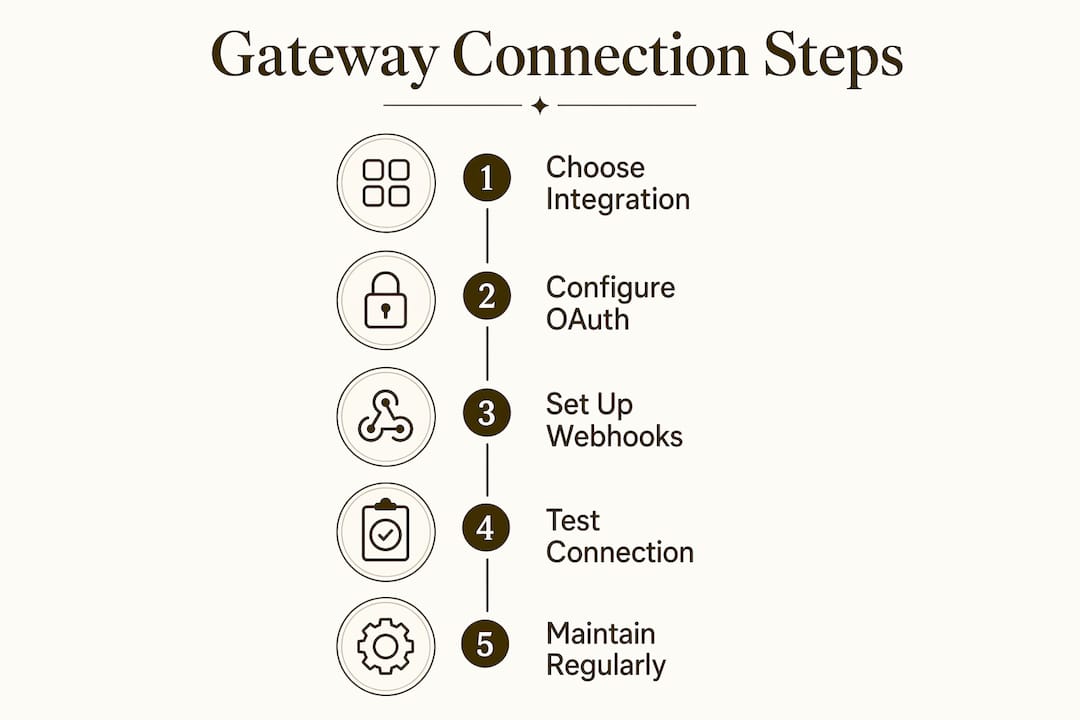
Follow these steps in order. Skipping steps, especially webhook configuration and sandbox testing, is the most common cause of live payment failures.
-
Install the official plugin. Go to your platform’s plugin marketplace and install the official plugin for your chosen payment gateway. Never download plugins from unverified third-party sources.
-
Connect using OAuth or API keys. Modern integrations have shifted from manual API key entry to OAuth one-click authorization, which avoids credential exposure entirely. OAuth has been the standard in official plugins since 2025. If your gateway offers OAuth, use it.
-
Configure payment settings. Inside your plugin settings, enable the payment methods your customers use most. Set your currency, transaction mode (live vs. test), and any fraud filter thresholds the gateway provides.
-
Set up webhook endpoints. Your gateway needs a URL to send real-time payment event notifications to your store. Webhooks enable real-time synchronization of payment events with order updates, refunds, and product access. Copy the webhook URL from your plugin settings and paste it into your gateway dashboard. Verify the endpoint is active.
-
Enable required payment methods. Activate card payments, and consider ACH or alternative methods based on your customer base. Note that ACH payments settle in 2–3 business days, while card networks authorize in real time but settle in 24–48 hours. Plan your order fulfillment workflow around these timelines.
-
Test in sandbox mode. Switch your plugin to test mode and run transactions using your gateway’s sandbox credentials. Simulate successful payments, declined cards, expired cards, and authorization timeouts.
-
Go live. Once all test scenarios pass, switch to live mode, enter your live credentials, and place a real low-value test transaction to confirm end-to-end processing.
Pro Tip: Use OAuth authorization whenever your gateway supports it. It eliminates the risk of API key exposure and typically completes the connection in under two minutes.
Why webhook setup matters more than most merchants realize
Failing to properly implement asynchronous webhook event processing leads to reconciliation issues and lost revenue from missed refunds or delayed charges. A webhook is not optional. Without it, your store does not know when a payment succeeds, fails, or gets refunded unless a customer manually returns to the confirmation page. That gap creates order fulfillment errors and customer service problems at scale.
Billing and subscription logic should be embedded in your platform’s state, not treated as a one-time payment event. For subscription merchants, this means your webhook handler must update subscription status, trigger renewal charges, and revoke access on failed payments, all automatically.
What are common mistakes in ecommerce payment gateway connections?
Most integration failures trace back to a small set of avoidable errors. Knowing them before you go live saves real money.
- Skipping webhook verification. Configuring a webhook URL is not enough. You must verify the endpoint responds correctly. Unverified webhooks silently fail, and your store stops receiving payment event data.
- Using outdated API key methods. API keys stored in plugin settings can be exposed through database breaches or plugin vulnerabilities. OAuth removes this risk by never storing credentials in your system.
- Not testing failure scenarios. Comprehensive testing must include intentional declines, timeouts, and invalid payment scenarios in sandbox before production launch. Most merchants only test successful payments, which leaves error handling untested.
- Ignoring PCI compliance scope. Merchants must understand compliance impact before selecting an integration type. Choosing a native API integration without understanding the SAQ D requirements creates audit complexity that can cost thousands of dollars to resolve.
- Letting plugins go stale. Payment gateway APIs update regularly. An outdated plugin version can break the connection without warning, causing checkout failures during peak traffic.
Pro Tip: Schedule a monthly review of your plugin versions and re-authenticate your OAuth connection every time your gateway provider releases a major update. This takes five minutes and prevents hours of troubleshooting.
Keeping checkout flow intact when errors occur
Your checkout page must handle payment errors gracefully. Display clear, specific error messages when a card is declined. Never show raw gateway error codes to customers. Redirect failed transactions back to the payment step with the cart intact, not to a generic error page. This single UX decision recovers a meaningful share of failed checkouts.
How to optimize and maintain your payment gateway integration
A live integration is not a finished integration. Payment infrastructure requires ongoing attention to stay secure, accurate, and cost-effective.
Integration is an ongoing commitment involving API design, tokenization, webhook monitoring, and adaptability to new payment methods. Merchants who treat setup as a one-time task consistently face data mismatches, compliance gaps, and missed revenue as their business grows.
Platform-native integrated payments reduce fees and complexity, often saving merchants significant money compared to stacking multiple third-party transaction layers. If your platform offers a native payment solution that meets your compliance and feature requirements, evaluate it seriously before adding external gateways.
| Maintenance action | Recommended frequency |
|---|---|
| Update payment gateway plugin | Monthly or on each release |
| Re-authenticate OAuth connection | After major gateway updates |
| Audit webhook endpoint responses | Weekly via gateway dashboard |
| Review PCI compliance documentation | Annually or after integration changes |
| Test sandbox for new payment methods | Before enabling each new method |
Keep your PCI compliance scope as narrow as possible. Every time you add a new integration layer or payment method, reassess whether your current SAQ category still applies. Hosted integrations that qualify for SAQ A carry far less audit burden than native API setups. As you scale, the financial benefit of a branded checkout must outweigh the compliance cost of maintaining SAQ D status.
Plan for regional payment methods early. Customers in different markets expect local payment options. Adding regional gateways or alternative payment methods later is significantly harder than building that flexibility into your initial architecture.
Key takeaways
A successful ecommerce plugin payment gateway connection requires choosing the right integration type, configuring webhooks correctly, and committing to ongoing maintenance rather than treating setup as a one-time task.
| Point | Details |
|---|---|
| Choose integration type carefully | Hosted gateways reduce PCI scope; native API integrations offer more checkout control but require SAQ D compliance. |
| Use OAuth over API keys | OAuth authorization eliminates credential exposure and completes the connection faster than manual key entry. |
| Configure and verify webhooks | Unverified webhooks cause reconciliation failures, missed refunds, and order fulfillment errors. |
| Test all failure scenarios | Run intentional declines, timeouts, and invalid card tests in sandbox before going live. |
| Maintain the integration actively | Update plugins monthly, audit webhooks weekly, and review PCI documentation annually. |
What I’ve learned from watching merchants get this wrong
Most merchants treat payment gateway integration as a technical checkbox. Get the plugin installed, enter the credentials, run one successful test payment, and call it done. That approach works until it doesn’t, and when it fails, it fails during checkout.
The merchants I’ve seen handle this well share one habit: they treat the integration as infrastructure, not a feature. They monitor webhook delivery logs the same way they monitor inventory. They test their checkout with declined cards every time they update a plugin. They know their PCI SAQ category by heart and understand exactly what changes would push them into a higher compliance tier.
The OAuth shift is real and worth taking seriously. Merchants still using static API keys stored in plugin settings are carrying unnecessary credential risk. The transition to OAuth-based authorization is not just a convenience upgrade. It is a security architecture improvement that removes a whole class of breach vectors.
High-risk merchants face an additional layer of complexity here. Standard ecommerce platforms and generic gateway plugins are not built for subscription billing, nutraceuticals, telehealth, or other regulated verticals. The integration works on the surface, but the underlying acquiring relationship, fraud rules, and chargeback handling are not calibrated for your business model. That mismatch shows up as account terminations, reserve holds, and processing interruptions at the worst possible times.
The right gateway connection is not just about getting payments to go through. It is about building payment infrastructure that holds up under volume, regulatory scrutiny, and the inevitable edge cases your checkout will encounter.
— Peter
Davincipay’s payment processing for ecommerce merchants
Davincipay specializes in payment processing for ecommerce businesses that need more than a standard gateway connection. That includes high-risk verticals like nutraceuticals, supplements, telehealth, and subscription merchants who face acquiring challenges that generic platforms cannot solve.
Davincipay provides domestic and international acquiring relationships, fraud prevention tools, chargeback mitigation, and compliance support built specifically for complex ecommerce operations. The onboarding process is direct, and approvals move fast. If your business needs a secure payment processing foundation that matches your actual risk profile, visit Davincipay and apply for an account to get started.
FAQ
What is an ecommerce plugin payment gateway connection?
An ecommerce plugin payment gateway connection is the integration between your store’s payment plugin and a payment gateway that authorizes and processes customer transactions. The connection is established using OAuth authorization or API keys, depending on the gateway and platform.
What is the difference between hosted and native API integrations?
Hosted integrations redirect customers to the gateway’s payment page, reducing your PCI DSS compliance burden to SAQ A. Native API integrations keep customers on your site but require SAQ D compliance, which involves significantly more documentation and audit requirements.
Why are webhooks required for payment gateway integration?
Webhooks deliver real-time payment event notifications from the gateway to your store. Without them, your platform cannot automatically update order status, trigger refunds, or manage subscription renewals based on payment outcomes.
How do I test my payment gateway connection before going live?
Use your gateway’s sandbox environment to simulate successful payments, declined cards, expired cards, and authorization timeouts. Testing only successful payments leaves error-handling gaps that surface as customer-facing failures after launch.
What is OAuth authorization in payment gateway integration?
OAuth is a one-click authorization method that connects your plugin to your gateway account without storing API credentials in your system. It reduces credential exposure risk and has been the standard in official gateway plugins since 2025.


.webp)